The App Question: What You Actually Download When You Want to Play
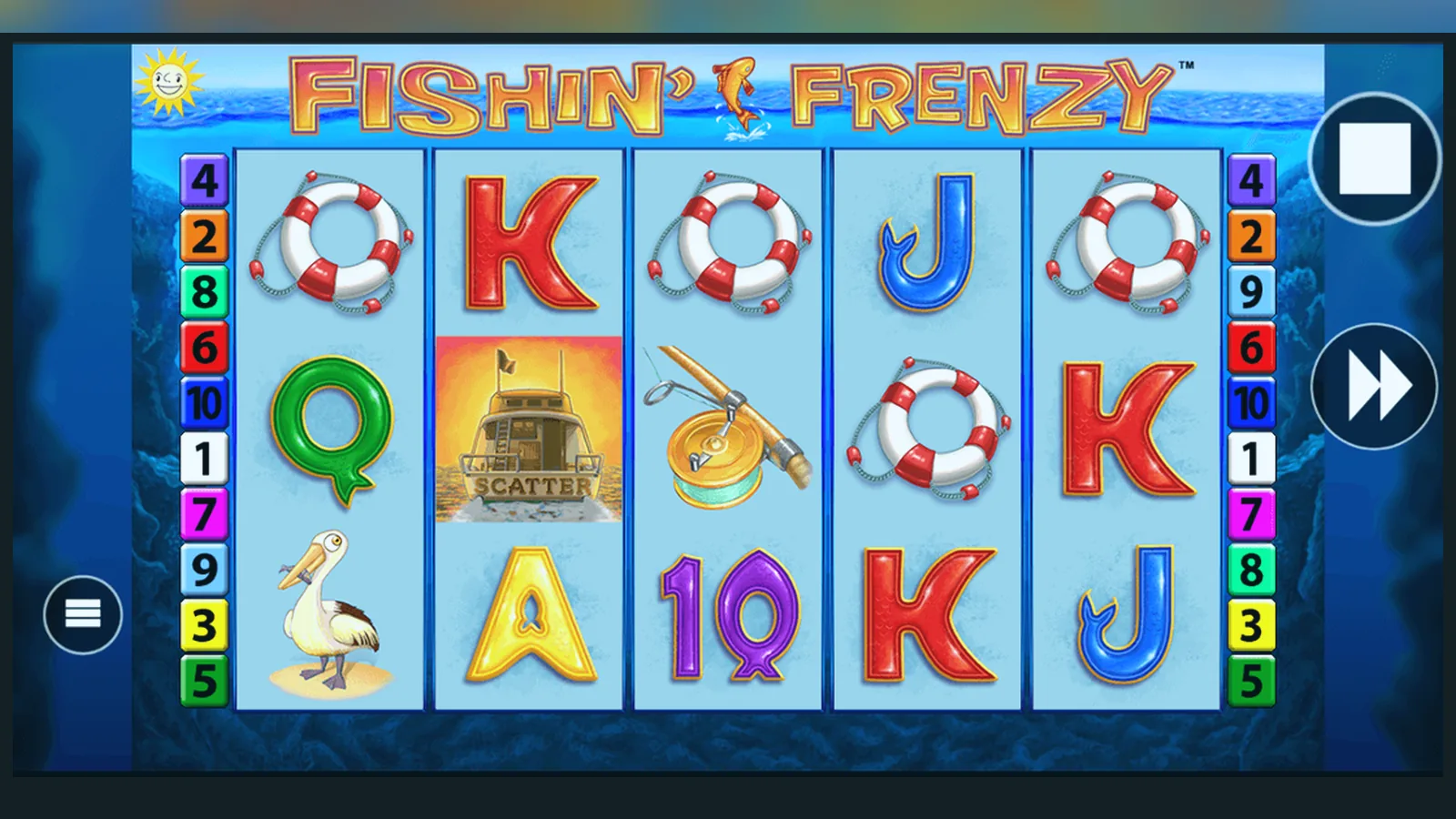
Here's the number that matters: zero standalone Fishin' Frenzy apps exist in the Google Play Store or Apple App Store. The game isn't distributed as a separate download — it lives inside casino operator apps or runs in your mobile browser. That's the first fact to get straight, because search results are full of APK sites claiming otherwise.
This page walks through what actually happens when you want to play on a phone: which operators have apps, how the browser route works, what those APK files really are, and how to check you're not installing a clone that hoovers up your payment details. We'll also break down a typical operator app listing so you know what to expect before you tap Install.
The Store Card You'd See (If the Game Had Its Own App)
Fishin' Frenzy doesn't have a dedicated app, but to illustrate what legitimate casino apps look like in the UK market, here's a plausible store listing format. Real operator apps serving British players follow this structure, with the UKGC licence number always visible in the app description or on the About screen.
The «In-app purchases» line is where UK regulation shows up: credit cards have been banned for gambling since April 2020, and the app won't accept them. The £5.00 cap reflects the maximum stake per spin for players aged 25 and over; if you're 18–24, that drops to £2.00, and the app should enforce it at account level once you've verified your age.
Five Screens You'd Navigate Inside an Operator App
When you open a UKGC-licensed casino app that hosts Fishin' Frenzy, you'll move through a handful of screens before the reels spin. Here's what each one does.
- Login / Age Gate: Enter your credentials or sign up. The app checks your date of birth against the UKGC register and may ask for a document upload (passport, driving licence) before you can deposit. This step usually takes 24–48 hours on a first account.
- Lobby: A scrollable grid of game tiles, with a search bar at the top. Fishin' Frenzy sits in the «Slots» or «Popular» category. Tap the tile to see the paytable preview and demo / real-money toggle.
- Game Launch: The slot loads in full-screen portrait or landscape. You'll see the fisherman bobbing on the left, the 5×3 grid in the centre, and the spin button at the bottom. Stake selector is usually a coin icon; tap it to choose £0.10 to £5.00 (or £0.10 to £2.00 if you're under 25).
- Free Spins Trigger: When three or more scatter fishermen land, the screen transitions to the bonus round with a ripple animation. Prize fish appear with multiplier values, and the fisherman collects them. The round plays out automatically; you can't skip it.
- Cashier: Accessible from the menu icon (three horizontal lines, top left). Shows your balance, deposit methods (debit card, PayPal, Trustly, paysafecard), withdrawal options (Faster Payments to your bank, e-wallet), and your transaction history. The first withdrawal triggers KYC document review, adding 1–3 working days to the payout time.
Every licensed app also surfaces safer-gambling tools here: deposit limits (daily, weekly, monthly), reality checks (a pop-up every X minutes reminding you how long you've played), and a link to GAMSTOP self-exclusion. The affordability-check threshold — £150 net deposits in a calendar month — runs in the background; if you cross it, the operator will request bank statements or payslips before you can deposit more.
Four Install Paths, Ranked by Risk
You have four ways to get Fishin' Frenzy on your phone. The first two are low-risk and take under a minute. The last two carry real danger if you're not careful.
- Browser (Instant Play): Open Safari (iOS) or Chrome (Android), navigate to a UKGC-licensed operator, log in, find Fishin' Frenzy in the lobby, tap Play. The game loads in HTML5 without any download. Risk: near zero, as long as the site's UKGC licence number is in the footer. Check the UKGC public register to confirm the number is genuine.
- Add to Home Screen (Progressive Web App): On the operator's mobile site, tap the Share icon (iOS) or the three-dot menu (Android), then «Add to Home Screen». This creates a shortcut that opens the site in a full-screen browser window, mimicking an app. No code is installed on your device. Risk: zero, assuming you're adding the legitimate operator URL.
- Operator App from Google Play or App Store: Search for the operator's name (e.g., «Paddy Power Casino», «Ladbrokes Slots»), tap Install, open the app, and search for Fishin' Frenzy inside. The app is vetted by Google and Apple, and the operator's UKGC licence applies to the app version. Risk: low if you verify the developer name matches the operator and the licence number is shown in the app's About section.
- APK from a Third-Party Site: Download a .apk file from a website, enable «Install from Unknown Sources» in your Android settings, run the installer. Risk: high. APK sites are unregulated, and many bundle malware, ad-injectors, or fake payment screens that steal card details. Even if the APK is a repackaged legitimate app, you won't receive updates, and the operator can't verify your device's integrity, so your account may be suspended.
The overwhelming majority of players use routes 1 or 2. Browser play is frictionless, and add-to-home-screen gives you the app-like experience without the install overhead. Route 3 makes sense if you want push notifications for promotions or faster login via Face ID. Route 4 is almost never worth the risk unless you're testing an app in a sandboxed environment for research purposes.
Phone Requirements and What Actually Runs
Fishin' Frenzy is an HTML5 slot, so it adapts to whatever screen you throw at it. Minimum specs are forgiving, but older devices will struggle with the animation of the fisherman reeling in prizes during the free-spins round.
- Android: version 7.0 (Nougat) or later, 2 GB RAM, Chrome 90+. The game will run on budget handsets from 2019 onwards, though frame rate may drop during bonus rounds on devices with less than 3 GB RAM.
- iOS: version 12.4 or later, iPhone 6s or newer. Safari is the only supported browser on iOS; Chrome and Firefox on iOS still use Safari's WebKit engine under the hood, so performance is identical.
- Screen size: playable on anything from a 4.7-inch iPhone SE to a 6.7-inch Android phablet. Portrait mode is the default on phones; landscape works but pushes the spin button awkwardly to the side.
- Connection: 3G is technically sufficient (the game loads around 8 MB of assets on first launch), but 4G or Wi-Fi is recommended to avoid stuttering during the scatter-trigger animation.
Operator apps themselves weigh 60–120 MB depending on how many games they bundle. The Fishin' Frenzy assets are fetched from Blueprint's servers on demand, so the app size doesn't grow each time a new slot is added to the library.
Version Notes: What Changed in the Mobile Build
Blueprint Gaming doesn't publish separate version numbers for Fishin' Frenzy because the game is server-based — the RNG and paytable logic run on Blueprint's backend, and your phone just renders the front end. When you see a «version» in an operator app, it refers to the app wrapper, not the game itself.
That said, Blueprint has made incremental updates to the mobile interface over the past two years. The most recent changes, rolled out in early 2026, include:
- Tap-to-stop reels: Previously, the spin resolved at a fixed speed. Now you can tap the grid to force an instant stop, handy if you're chaining spins quickly. The outcome is predetermined by the RNG, so this doesn't affect results — it just skips the animation.
- Pinch-to-zoom paytable: On the info screen (accessed via the «i» icon), you can now pinch to enlarge the paytable rows. Useful on smaller screens where the £ values were hard to read.
- Auto-play counter overlay: When auto-spins are running, a small countdown badge appears in the bottom-right corner showing how many spins remain. Previously this number was only visible in the settings panel.
- Reduced motion mode: If your phone's accessibility settings have «Reduce motion» enabled, the fisherman's reel-in animation is replaced by a faster fade-and-collect sequence. Cuts the bonus-round duration by roughly 30%.
None of these changes touch the RTP (96.00% to 96.12% depending on operator configuration) or the volatility. The maths model is locked at Blueprint's end and certified by independent testing labs before the game goes live in any jurisdiction.
Spotting Clones and Dangerous Permissions
Fake Fishin' Frenzy APKs are common because the game's name ranks well in search. Clones range from harmless ad-laden knockoffs to outright malware. Here's how to tell the difference and what to avoid.
Red flags in the app listing or APK file:
- Developer name doesn't match a known UKGC-licensed operator. Blueprint Gaming does not distribute consumer-facing apps — only B2B integrations for casinos.
- The app is labelled «Official Fishin' Frenzy» or «Blueprint Slots» with a generic icon (e.g., a cartoon fish). Legitimate operator apps use the operator's branding, not the game's artwork.
- The download is hosted on a file-sharing site (MediaFire, Mega, Zippyshare) rather than Google Play or a verifiable operator domain.
- The APK file size is suspiciously small (under 10 MB) or enormous (over 300 MB). Real casino apps sit between 60 MB and 150 MB.
- The app description promises «unlimited free spins», «hack tool», or «cheat codes». RNG-based slots can't be manipulated client-side.
Dangerous Android permissions that no legitimate casino app needs:
- READ_CONTACTS or WRITE_CONTACTS: no reason for a gambling app to access your address book.
- SEND_SMS or READ_SMS: often used to intercept two-factor authentication codes or silently subscribe you to premium-rate SMS services.
- RECORD_AUDIO or CAMERA without justification: some apps request camera access for KYC document upload, but if the app asks before you've even logged in, that's a red flag.
- INSTALL_PACKAGES or REQUEST_INSTALL_PACKAGES: allows the app to install other apps in the background without your consent.
- SYSTEM_ALERT_WINDOW: draws overlays on top of other apps, used by malware to fake login screens and steal credentials.
Legitimate permissions a casino app will request: storage (to cache game assets), network access (obvious), location (some operators restrict play to users physically in the UK), and biometric authentication (Face ID, fingerprint for login). If an APK asks for anything beyond that list before you've created an account, uninstall it.
FAQ
Can I download Fishin' Frenzy directly from the App Store?
No standalone Fishin' Frenzy app exists in the App Store or Google Play. The game is integrated into casino operator apps licensed by the UKGC. Search for the operator's name (e.g., Coral, Betfair, Sky Betting & Gaming), install their casino app, then find Fishin' Frenzy in the slots lobby. Alternatively, play in Safari or Chrome without installing anything — the browser version is identical.
Are APK files safe if they come from a well-known download site?
No. Third-party APK sites aren't regulated, and even «clean» APKs (no malware detected) can be outdated, stripped of security patches, or modified to inject ads. Operators can also flag your account if they detect you're using an unofficial build. Stick to Google Play for Android apps, or use the operator's mobile site in your browser. iOS users can't install APKs at all.
Why does the operator app ask for my location?
UKGC rules require operators to verify you're physically in the UK when you play for real money. The app uses GPS or Wi-Fi triangulation to confirm your location. If you're using a VPN or travelling abroad, the app will block real-money play (though demo mode may still work). This is a licence requirement, not an operator choice.
What happens if I cross the £150 deposit threshold in a month?
Affordability checks kick in once your net deposits (deposits minus withdrawals) reach £150 in a calendar month. The operator will request proof of income — recent payslips, bank statements, or a tax return. This is stage-one screening; if your deposits climb into the thousands, expect more detailed financial review. The threshold applies across all UKGC sites, and data is shared via credit-reference agencies, so depositing £100 at three different operators will still trigger the check.